> For the complete documentation index, see [llms.txt](https://documentation.immuta.com/SaaS/llms.txt). Markdown versions of documentation pages are available by appending `.md` to page URLs; this page is available as [Markdown](https://documentation.immuta.com/SaaS/request/configure/reference-guides/walkthrough.md).
# Use Immuta as a Marketplace
Understand how Immuta can be used as a marketplace for your data products
If you do not currently have a marketplace solution for your data products, you can create a marketplace in Immuta for your users to browse curated data products and request access to those data products. Then your data stewards can make determinations in Immuta that translate directly to Immuta policies and automatic access provisioning.
Figure 1: Workflow
*Figure 1 depicts the workflows available. This walkthrough will guide you through these steps.*
Some of these steps are performed by different user types in Immuta, so this walkthrough is organized by [User type](/SaaS/request/introduction/user-types.md).
## Governance and user admin users
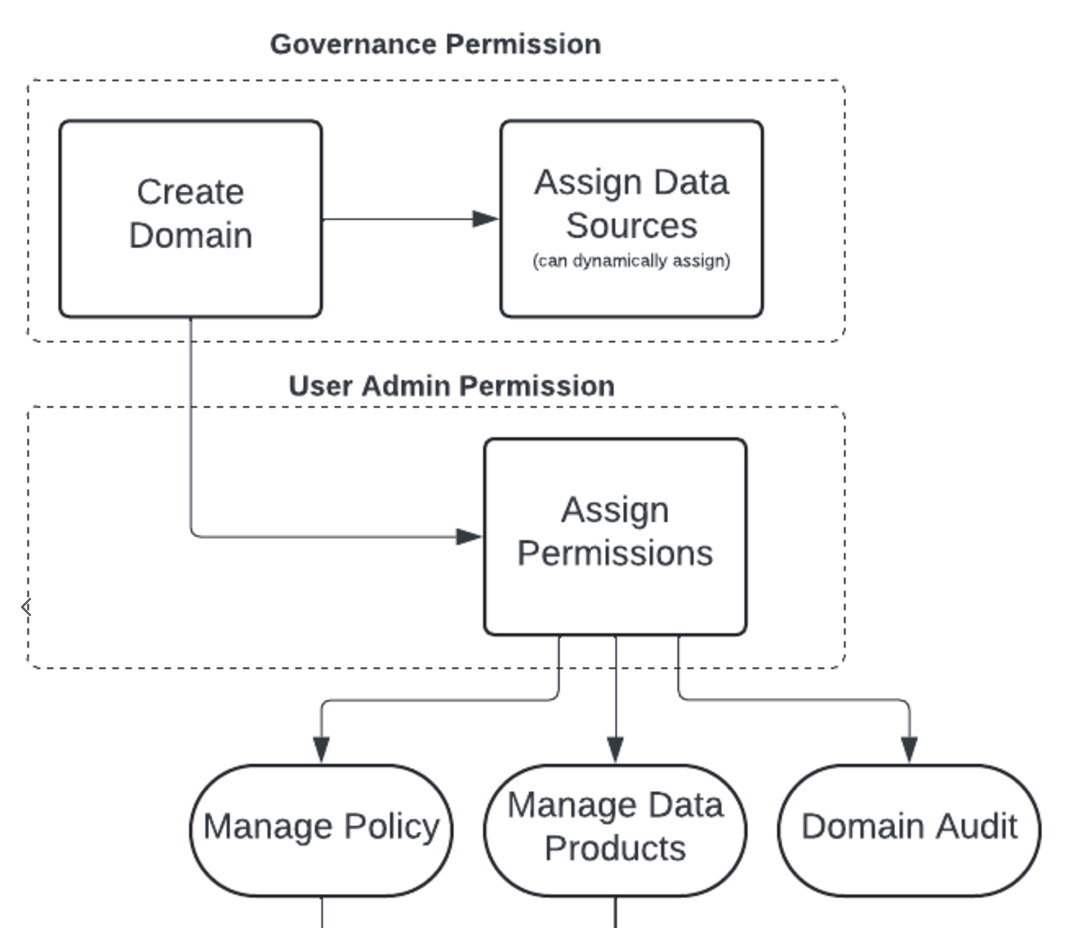
The data sources that are exposed through your data products are sourced from a domain; so in order to publish a data product, you must have at least one domain with at least one data source in it. Any user with the Immuta `GOVERNANCE` permission is able to publish data products in the Request app using any domain. However, this job can be delegated by [creating data product managers](#data-product-manager-user). You create data product managers by giving them [the `Manage Data Products` permission in a domain](/SaaS/request/introduction/user-types.md#delegating-to-data-product-owners).
Figure 2: Delegating to Data Product Managers
As shown in Figure 2, [creating a domain and assigning data sources](/SaaS/configuration/domains/domains.md) to it is handled by a user with `GOVERNANCE` permission. Assigning the `Manage Data Products` permission is handled by a user with `USER_ADMIN` permission.
These actions are completed in the Govern app, not the Request app.
## Data product manager user
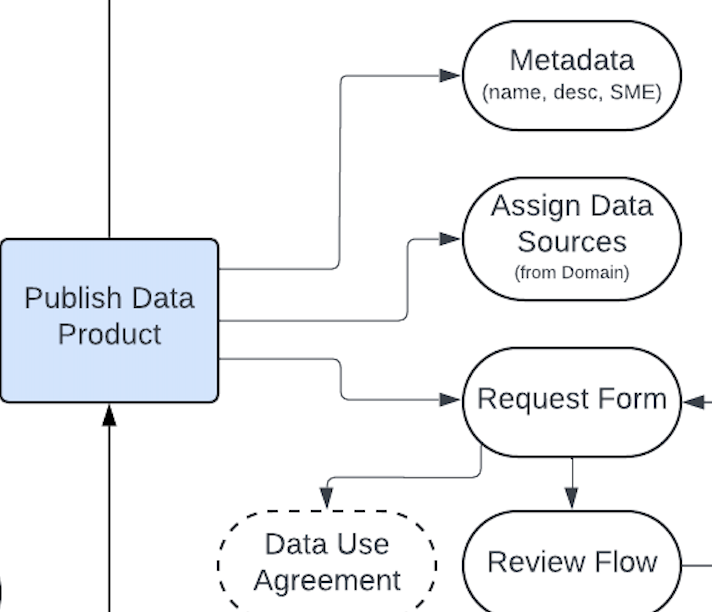
This user is able to publish the data products, manage their metadata, and manage request forms. As mentioned above, a data product manager must have the global `GOVERNANCE` permission or the domain-specific `Manage Data Products` permission in a domain.
By publishing a data product, data product managers make data discoverable to business users, enable self-service requests, and establish a workflow that enforces approvals, usage agreements, and auditability. If data products include datasets with masked columns, users will be able to request access to unmask specific fields through masking exception workflows as well. When users create data products, they turn static datasets into governed objects that can be shared with confidence, speeding up time-to-data while maintaining control.
{% hint style="success" %}
**Tip:** If your access strategy is based on data assets (tables, schemas, databases), you can skip data product creation and [allow users to request access directly from the data platform](/SaaS/request/configure/reference-guides/start-from-your-data-catalog.md).
{% endhint %}
:paper-plane: When a new data product is published, a webhook is sent off and users with `Manage Data Products` permission in that data product's domain will receive a notification.
Figure 3: Creating and managing a data product
The first step in creating a data product is ensuring that the data sources that make up the data product are contained in the domain where you have the `Manage Data Products` permission.
### Making data sources available in a domain
See the [Setting up domains for data product management page](/SaaS/configuration/domains/setting-up-domains-for-marketplace.md) for details about how to automatically have data sources be assigned to domains.
## Data consumer user
Once data products are published in the Request app, consumers can quickly find and [request access](/SaaS/request/access-data-products/how-to-guides/requesting-access-to-a-data-product.md) without relying on tickets or manual provisioning. It streamlines the process while enforcing governance policies and approvals behind the scenes.
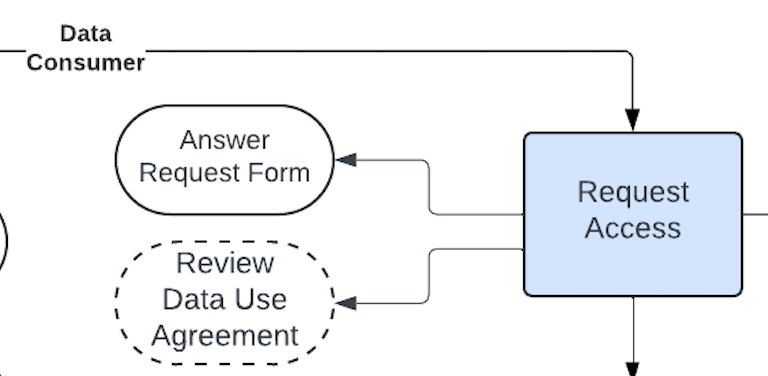
As a data consumer, the Request app allows you to search, request, and get access to the data you need, as shown in Figure 4:
1. **Discover the data product in the Request app**: Search for the published data product to confirm it's visible and discoverable.
2. **Submit an access request for a data product**: Click on the data product to review its description, metadata, and any attached DUA. Submit a request, answering any custom questions defined in the workflow.
3. **Track your request status**: After submitting, you can monitor the status of your request. If configured for auto-approval, access may be granted instantly for low-risk, fully protected datasets. Otherwise, requests are routed to approvers and reviewers for evaluation.
:paper-plane: Once a data consumer requests access, a webhook is sent off and Immuta will send notifications to the data stewards of the data product.
Figure 4: Requesting Access
## Data steward user
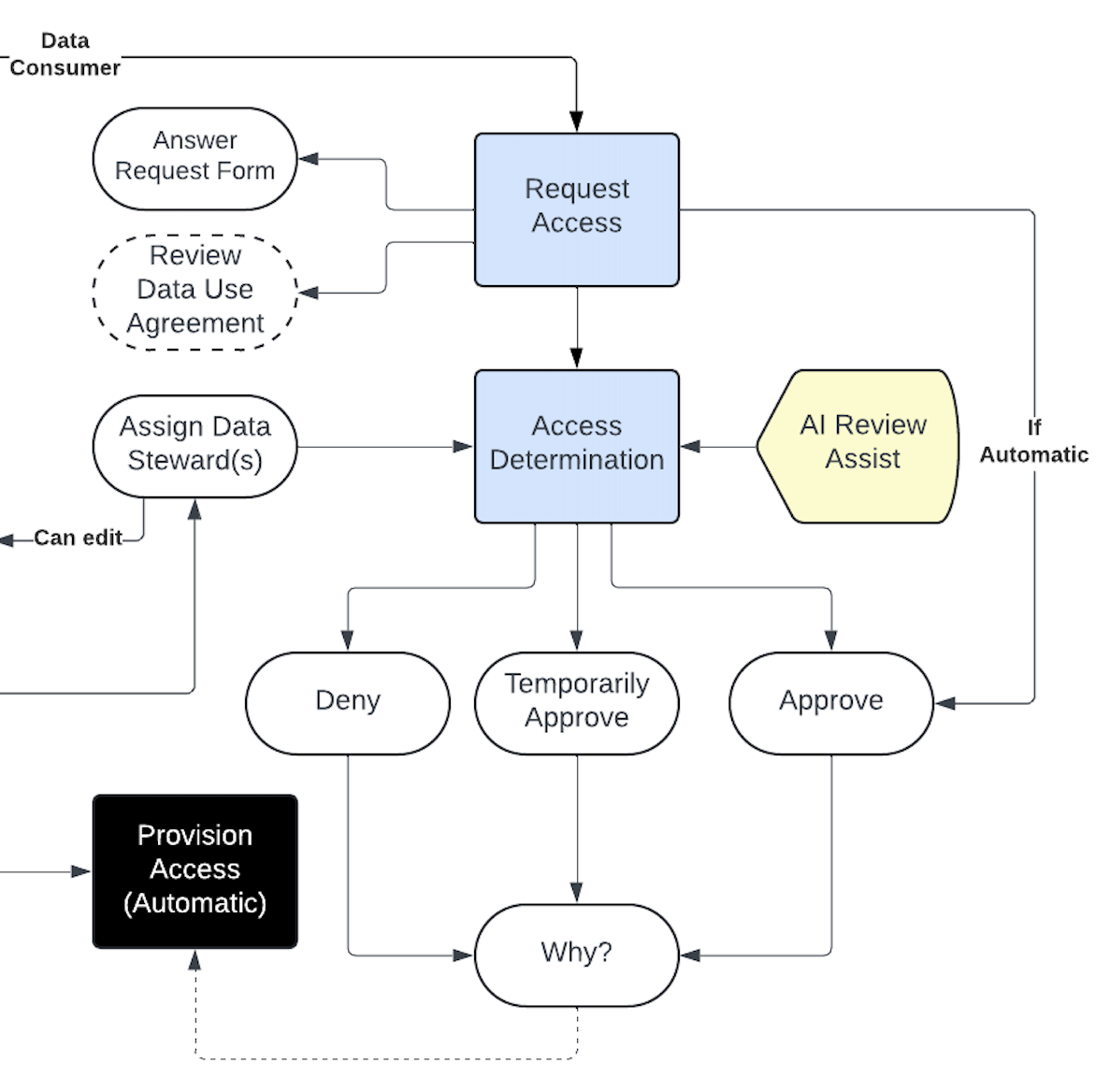
The data stewards are tasked with [making determinations](/SaaS/request/review-access-requests/how-to-guides/view-and-respond-to-access-requests.md) on access requests, the final step in the workflow depicted in Figure 5.
Figure 5: Access Request Determination
Data stewards are assigned to data products in the request form used; they can be assigned based on their group, attributes, or permissions or the exact user can be assigned. If the data stewards are not assigned in a request form, the data product owner will select them for each data product. The request form will also dictate if any data steward can approve an access request or if all of them must.
:paper-plane: When an access request is made that requires approval, a webhook is sent off and data stewards will receive a notification with the request. Additionally, it will appear as pending, signaling a determination is required.
The data steward [can make the determination](/SaaS/request/review-access-requests/how-to-guides/view-and-respond-to-access-requests.md) by approving, denying, or temporarily approving it with a reason. If approved, Immuta will automatically provision access by granting data product access in the data platform or unmasking the approved columns, completing the workflow depending on the request type. When any data steward can approve, just a single determination will dictate the user's access. However, if all data stewards must approve, [one determination must be made by one data steward](#user-content-fn-1)[^1] belonging to each of the assigned groups, attributes, or permissions. If a single data steward denies access, the user will not get access.
As an approver, data stewards have responsibilities to the access requests:
1. **Review access requests**: In the Request app, data stewards view all pending requests for data products within their domain or that users with their permissions are assigned to.
2. **Approve or deny requests with confidence**: Data stewards can view the requestor’s responses to workflow questions and any attached DUA.
3. **Automate approvals for low-risk data**: If the data product was configured for auto-approval, requests are granted instantly, reducing manual workload.
:paper-plane: When a final determination is made for an access request, a webhook is sent off and the requester and all other data stewards for the data product will receive a notification with the decision.
[^1]: For example, if the request form lists users with the `GOVERNANCE` permission and users with the HR group as data stewards, then one user with the `GOVERNANCE` permission and one user with the HR group must approve to satisfy each of those conditions. A single user may approve for all conditions in a request form if they have the necessary permissions.
---
# Agent Instructions
This documentation is published with GitBook. GitBook is the documentation platform designed so that both humans and AI agents can read, navigate, and reason over technical content effectively. Learn more at gitbook.com.
## Querying This Documentation
If you need additional information that is not directly available in this page, you can query the documentation by asking a question.
Perform an HTTP GET request on the following URL with the `ask` and `goal` query parameters:
```
GET https://documentation.immuta.com/SaaS/request/configure/reference-guides/walkthrough.md?ask=&goal=
```
`ask` is the immediate question: it should be specific, self-contained, and written in natural language.
`goal` is what the user is ultimately trying to achieve, the reason they need the answer. Sharing it helps GitBook give you a better, more relevant answer. A goal is most helpful when it describes the outcome the user wants rather than restating the question. For example, with `ask=how do I create an API token`, a goal like `automate deployments from our CI pipeline` lets GitBook tailor the answer to that use case.
The response will contain a direct answer to the question and relevant excerpts and sources from the documentation.
Use this mechanism when the answer is not explicitly present in the current page, you need clarification or additional context, or you want to retrieve related documentation sections.
.png?alt=media)