# AWS PrivateLink for Snowflake

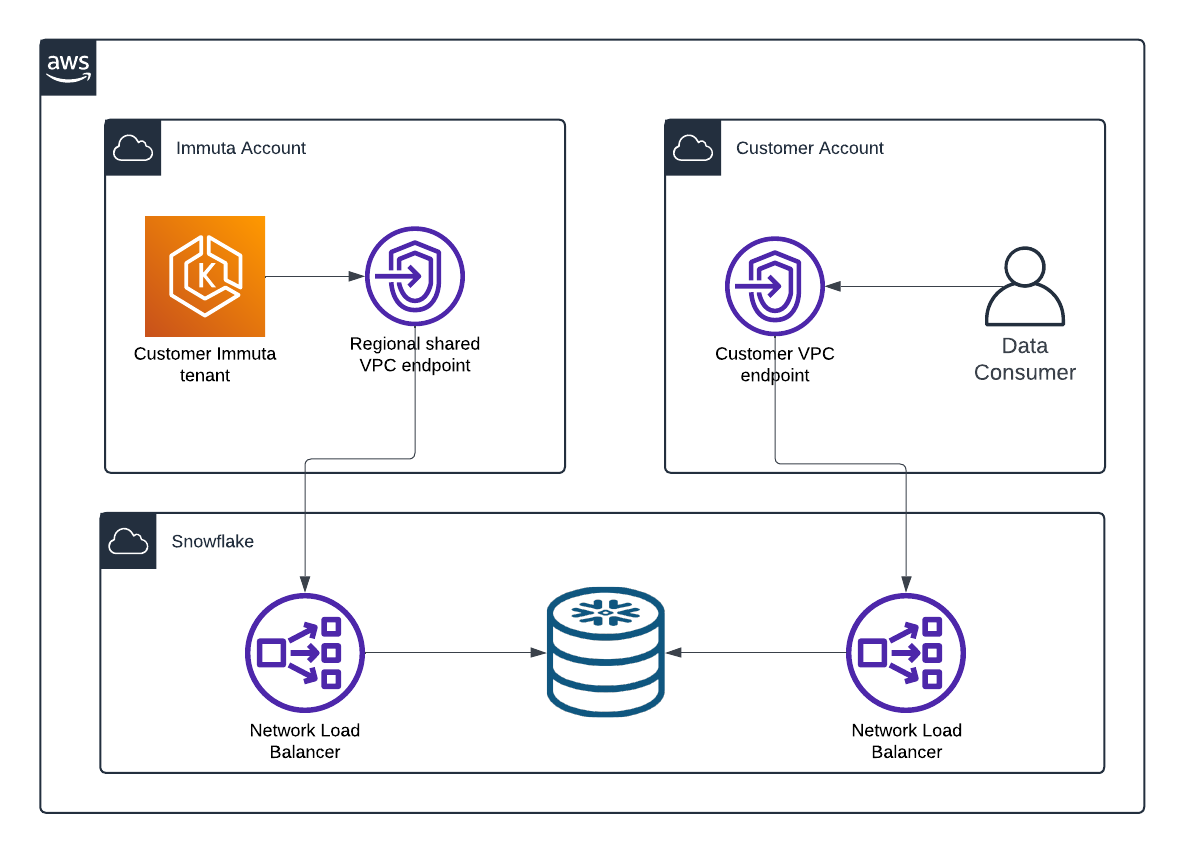
[AWS PrivateLink](https://docs.aws.amazon.com/vpc/latest/privatelink/what-is-privatelink.html) provides private connectivity from the Immuta SaaS platform to Snowflake accounts hosted on AWS. It ensures that all traffic to the configured endpoints only traverses private networks.

This feature is supported in most regions across Immuta's global segments (NA, EU, and AP); contact your Immuta representative if you have questions about availability.

<figure><img src="/files/AHzm8yXYPUevJmLKjRzM" alt=""><figcaption></figcaption></figure>

## Requirements

* You have an Immuta SaaS tenant.
* Your Snowflake account is hosted on AWS.
* Your Snowflake account is on the [Business Critical Edition](https://docs.snowflake.com/en/user-guide/intro-editions#feature-edition-matrix).
* You have `ACCOUNTADMIN` role on your Snowflake account to configure the Private Link connection.
* You have enabled [AWS PrivateLink for Snowflake](https://docs.snowflake.com/en/user-guide/admin-security-privatelink.html).

## Using Snowflake network policies with AWS PrivateLink

[Snowflake network policies](https://docs.snowflake.com/en/user-guide/network-policies) allow you to limit access to your Snowflake service endpoints. [Network rules](https://docs.snowflake.com/en/user-guide/network-rules#incoming-requests) can be used with those network policies to define the specific IP CIDR blocks or AWS VPC endpoints that are allowed. Immuta supports both, but we **highly recommend that you configure your network rules to reference our VPC endpoints and not our CIDR block.**

### VPC endpoint network rule

With a network rule type of `AWSVPCEID`, you can use the following table of Immuta's VPC endpoints by AWS region to configure access from Immuta SaaS to your Snowflake service:

| AWS region                                                                      | VPC endpoint ID          |
| ------------------------------------------------------------------------------- | ------------------------ |
| <p><strong><code>ap-northeast-1</code></strong><br>Asia Pacific (Tokyo)</p>     | `vpce-0c738d241aa0bfde7` |
| <p><strong><code>ap-northeast-2</code></strong><br>Asia Pacific (Seoul)</p>     | `vpce-00daddfa7477666eb` |
| <p><strong><code>ap-south-1</code></strong><br>Asia Pacific (Mumbai)</p>        | `vpce-08a6d075ddd92df58` |
| <p><strong><code>ap-southeast-1</code></strong><br>Asia Pacific (Singapore)</p> | `vpce-030933ffc228d94ac` |
| <p><strong><code>ap-southeast-2</code></strong><br>Asia Pacific (Sydney)</p>    | `vpce-0803dc2285d0d695f` |
| <p><strong><code>ca-central-1</code></strong><br>Canada (Central)</p>           | `vpce-0ebff3192617126c9` |
| <p><strong><code>eu-central-1</code></strong><br>Europe (Frankfurt)</p>         | `vpce-07f633ac50bc430c2` |
| <p><strong><code>eu-north-1</code></strong><br>Europe (Stockholm)</p>           | `vpce-05c586fedca0a4112` |
| <p><strong><code>eu-west-1</code></strong><br>Europe (Ireland)</p>              | `vpce-0ac01be5c06a919b0` |
| <p><strong><code>eu-west-2</code></strong><br>Europe (London)</p>               | `vpce-0dd3c340c3dd64a5b` |
| <p><strong><code>us-east-1</code></strong><br>US East (Virginia)</p>            | `vpce-03b3bf4334aa34d88` |
| <p><strong><code>us-east-2</code></strong><br>US East (Ohio)</p>                | `vpce-04fdafe0ed07caace` |
| <p><strong><code>us-west-2</code></strong><br>US West (Oregon)</p>              | `vpce-06624165eaa569250` |

### IPv4 network rule

With a network rule type of `IPV4`, you must configure an IP address block of `10.0.0.0/8`.

This size of block is required because traffic could come from anywhere in Immuta's network. Immuta has globally distributed compute and does not assign static IP addresses to any workloads. This is why you should use VPC endpoint network rules instead.

## Configure Snowflake with AWS PrivateLink

1. In your Snowflake environment, run the following SQL query, which will return a JSON object with the connection information you will need to include in your support ticket:

   ```sql
   select SYSTEM$GET_PRIVATELINK_CONFIG()
   ```
2. Copy the returned JSON object into a support ticket with [Immuta Support](https://support.immuta.com) to request for the feature to be enabled on your Immuta SaaS tenant.
3. [Configure the Snowflake integration](/saas/configuration/integrations/snowflake/how-to-guides/connect-snowflake.md) using the `privatelink-account-url` from the JSON object in step one as the **Host.**


---

# Agent Instructions: Querying This Documentation

If you need additional information that is not directly available in this page, you can query the documentation dynamically by asking a question.

Perform an HTTP GET request on the current page URL with the `ask` query parameter:

```
GET https://documentation.immuta.com/saas/configuration/application-configuration/how-to-guides/private-networking-support/data-connection-private-networking/index-1/aws-privatelink.md?ask=<question>
```

The question should be specific, self-contained, and written in natural language.
The response will contain a direct answer to the question and relevant excerpts and sources from the documentation.

Use this mechanism when the answer is not explicitly present in the current page, you need clarification or additional context, or you want to retrieve related documentation sections.
