# MySQL Integration Reference Guide

{% hint style="info" %}
**Immuta policies will not be automatically enforced in MySQL**

While you can author and apply subscription and data policies on MySQL data sources within Immuta, these policies will not be enforced natively in the MySQL platform. You can use [Immuta webhooks](https://documentation.immuta.com/saas/developer-guides/api-intro/immuta-v1-api/configure-your-instance-of-immuta/webhooks#webhook-overview) to be notified about changes to user access and make appropriate access updates in MySQL using your own process.

To use this integration, contact your Immuta representative.
{% endhint %}

The MySQL integration uses connections to register data from MySQL in Immuta. Immuta supports the following deployment methods:

* Amazon Aurora with MySQL
* Amazon RDS with MySQL

## What does Immuta do in my environment?

### Registering a connection

MySQL is configured and data is registered through [connections](https://documentation.immuta.com/saas/configuration/integrations/data-and-integrations/registering-a-connection/reference-guides/connections-overview), an Immuta feature that allows you to register your data objects through a single connection to make data registration more scalable for your organization. Instead of registering schema and databases individually, you can register them all at once and allow Immuta to monitor your data platform for changes so that data sources are added and removed automatically to reflect the state of data in your data platform.

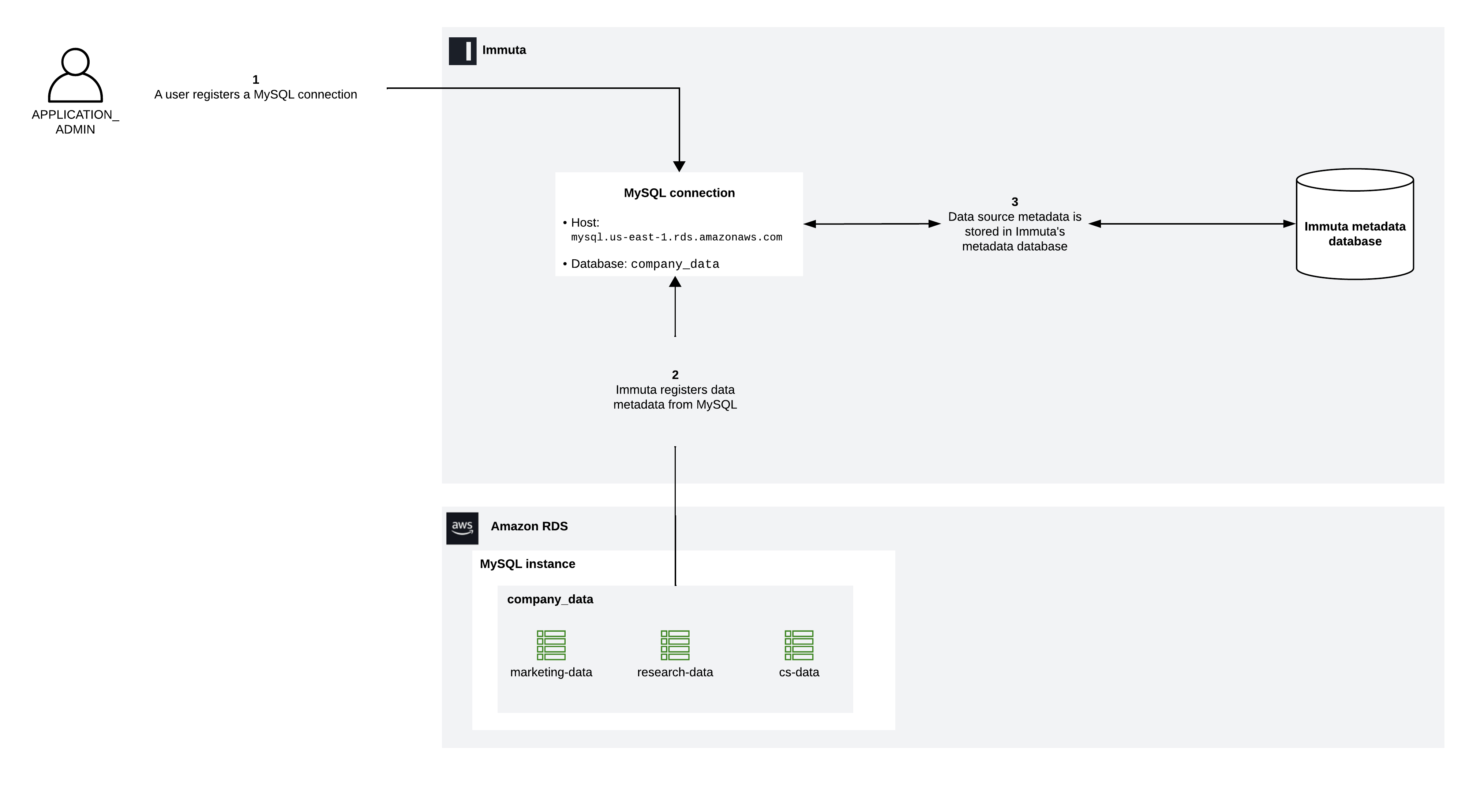
When the [connection is registered](https://documentation.immuta.com/saas/configuration/integrations/mysql/register-a-mysql-connection), Immuta ingests and stores connection metadata in the Immuta metadata database. In the example below, the Immuta application administrator connects the database that contains `marketing-data`, `research-data`, and `cs-data` tables. Immuta registers[^1] these tables as data sources and stores the table metadata in the Immuta metadata database.

<figure><img src="https://1751699907-files.gitbook.io/~/files/v0/b/gitbook-x-prod.appspot.com/o/spaces%2FlWBda5Pt4s8apEhzXGl7%2Fuploads%2FrkWF1jB47sLERn8lqGl3%2FMySQL%20connection%20-%20Register%20connection.png?alt=media&#x26;token=2a95155b-3f2f-4ef1-9720-9da114e52858" alt=""><figcaption></figcaption></figure>

Immuta presents a hierarchical view of your data that reflects the hierarchy of objects in MySQL after registration is complete:

* Host
* Database
* Data object

Beyond making the registration of your data more intuitive, connections provides more control. Instead of performing operations on individual schemas or tables, you can perform operations (such as object sync) at the connection level.

See the [Connections reference guide](https://documentation.immuta.com/saas/configuration/integrations/data-and-integrations/registering-a-connection/reference-guides/connections-overview) for details about connections and how to manage them. To configure your MySQL connection, see the [Register a MySQL connection guide](https://documentation.immuta.com/saas/configuration/integrations/mysql/register-a-mysql-connection).

### Required MySQL privileges

The privileges that the MySQL integration requires align with the least privilege security principle. The table below describes each privilege required by the [setup user](#user-content-fn-2)[^2] and the [`IMMUTA_SYSTEM_ACCOUNT`](#user-content-fn-3)[^3] user.

| MySQL privilege                                            | User requiring the privilege | Explanation                                                                                                              |
| ---------------------------------------------------------- | ---------------------------- | ------------------------------------------------------------------------------------------------------------------------ |
| Root user or `GRANT OPTION` privilege                      | Setup user                   | This privilege is required so that the setup user can grant privileges to the Immuta system account.                     |
| `SHOW DATABASES` on all databases in the server            | Immuta system account        | This privilege allows the Immuta system account to discover new databases to keep data in MySQL and Immuta in sync.      |
| `SHOW VIEW` on all views in the server                     | Immuta system account        | This privilege allows the Immuta system account to access view definitions.                                              |
| `SELECT` on all databases, tables, and views in the server | Immuta system account        | This privilege allows the Immuta system account to list columns required for collecting metadata about the data objects. |
### Maintaining state with MySQL

The following user actions spur various processes in the MySQL integration so that Immuta data remains synchronous with data in MySQL:

* **Data source created or updated**: Immuta registers data source metadata and stores that metadata in the Immuta metadata database.
* **Data source deleted**: Immuta deletes the data source metadata from the metadata database.

## Supported object types

While you can author and apply subscription and data policies on MySQL data sources in Immuta, these policies will not be enforced natively in the MySQL platform.

| Object type | Subscription policy support | Data policy support | Request app support  |
| ----------- | --------------------------- | ------------------- | -------------------- |
| Base tables | :x:                         | :x:                 | :white\_check\_mark: |
| Views       | :x:                         | :x:                 | :white\_check\_mark: |

## Immuta policies

Immuta will not apply policies in this integration.

## Security and compliance

### Authentication methods

The MySQL integration supports the following authentication methods when registering a connection:

* **Access using AWS IAM role (recommended)**: Immuta will assume this IAM role from Immuta's AWS account to request [temporary credentials](#user-content-fn-4)[^4] that it can use to perform operations in the registered MySQL database. This option allows you to provide Immuta with an IAM role from your AWS account that is granted a trust relationship with Immuta's IAM role.
* **Access using access key and secret access key**: These credentials are used by Immuta to register the connection and maintain state between Immuta and MySQL. The access key ID and secret access key provided must be for an AWS account with the privileges listed in the [Register a MySQL connection guide](https://documentation.immuta.com/saas/configuration/integrations/register-a-mysql-connection#create-a-database-user-account).
* **Username and password:** These credentials are used by Immuta to register the connection and maintain state between Immuta and MySQL. The credentials provided must be for a [MySQL user account with the privileges listed in the Register a MySQL connection guide](https://documentation.immuta.com/saas/configuration/integrations/register-a-mysql-connection#create-a-database-user-account).

## Limitations and known issues

The following Immuta features are unsupported:

* Subscription and data policies
* Identification
* Tag ingestion
* Query audit

[^1]: See the [Connections reference guide](https://documentation.immuta.com/saas/configuration/data-and-integrations/registering-a-connection/reference-guides/connections-overview#object-sync) for more details about how data objects are synced with Immuta so that the objects in MySQL stay synchronous with the registered objects in Immuta.

[^2]: The MySQL user registering the connection.

[^3]: This user account is used by Immuta to manage the connection once it has been set up.

[^4]: AWS rotates credentials every 15 minutes, so Immuta never stores these credentials. Immuta requests a new password every 15 minutes from AWS using this IAM role.
