> For the complete documentation index, see [llms.txt](https://documentation.immuta.com/saas/llms.txt). Markdown versions of documentation pages are available by appending `.md` to page URLs; this page is available as [Markdown](https://documentation.immuta.com/saas/configuration/people.md).
# Manage Users
Learn about managing users in Immuta
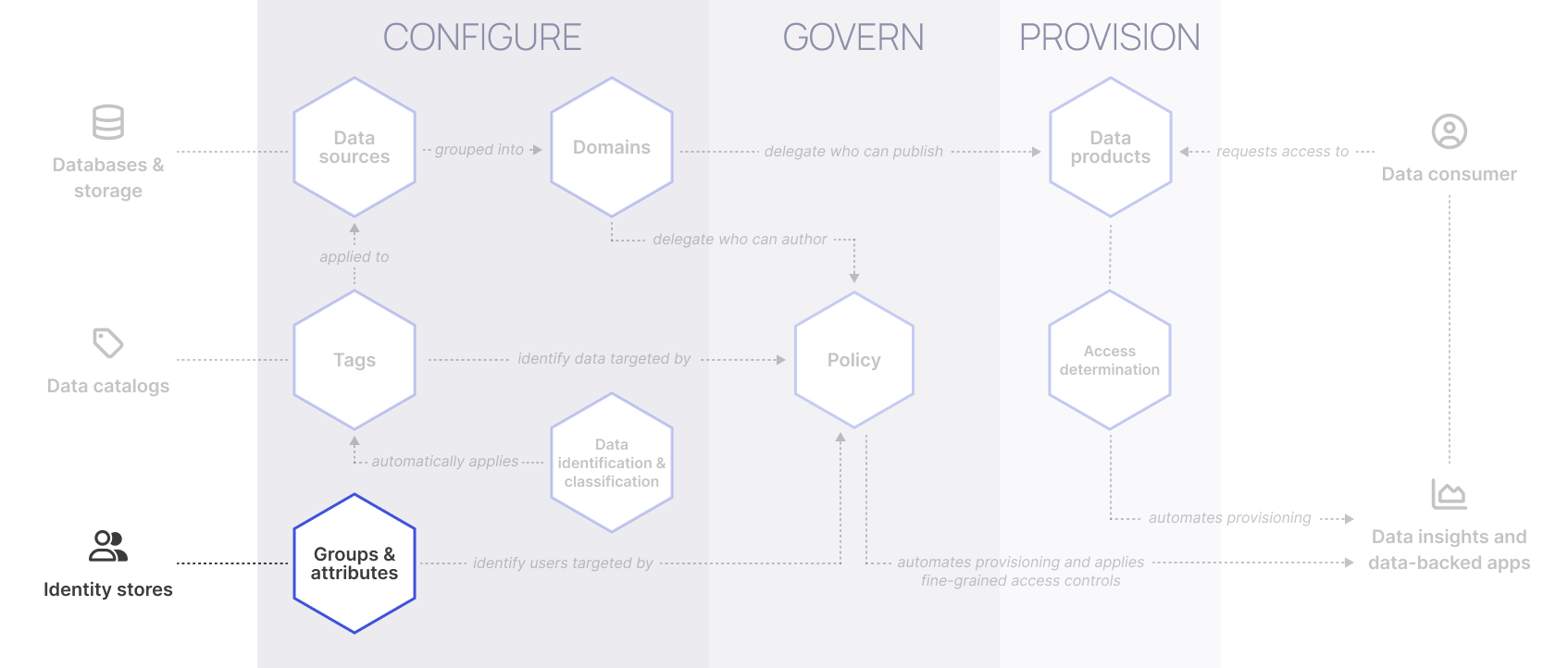
User metadata can be used in Immuta to identify Immuta users targeted by policies. By registering user metadata from your identity provider, you can simplify policy creation and ensure consistent enforcement across all data platforms.
## What is user metadata?
User metadata defines who a person is, specifically their attributes[^1] and [group memberships](#user-content-fn-2)[^2]. Once you add metadata to users through Immuta's built-in identity management system or sync your user metadata from your [identity provider](/saas/configuration/people/section-contents/reference-guides/index.md), users' attributes and groups can then be used to evaluate access to data. By using fact-based metadata to define your users and build your policies, you [decouple policy logic](/saas/govern/getting-started-with-secure/automate-data-access-control-decisions/managing-user-metadata.md) from individual user profiles, making policy creation more scalable and easier to manage.
See the [Identity management overview guide](/saas/configuration/people/section-contents/reference-guides/index.md) for details about how Immuta can stay in sync with changes to users in your identity provider. For guidance on creating policies using user metadata, see the [Governance use cases section](/saas/govern/getting-started-with-secure.md).
## Sourcing user metadata
Immuta supports the following options for registering user metadata, ensuring policies stay aligned with the latest identity information. For guidance on connecting your identity provider to Immuta to ingest user metadata, see the [Identity managers section](/saas/configuration/people/section-contents.md).
Direct integration with identity platforms
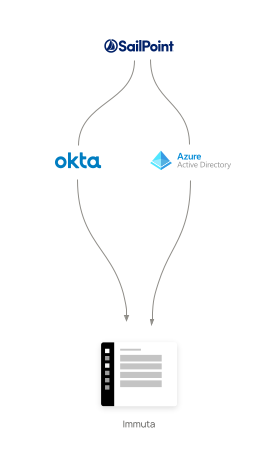
Immuta directly integrates with the major [identity management protocols](/saas/configuration/people/section-contents/reference-guides/index.md#iam-protocol-support-matrix) to register user metadata. This is the preferred method when attributes are centrally managed in an identity platform like Workday or SAP because Immuta automatically reflects changes to user profiles and group memberships.
* **Real-time syncing ensures policies stay current** by automatically reflecting updates to user attributes from your identity platform in Immuta.
* **Centralized attribute management simplifies governance** by reducing manual updates and eliminating the need for custom sync logic.
For organizations that need additional flexibility, [Immuta’s API](/saas/configuration/people/section-contents/reference-guides/custom-external.md) allows attributes to be pulled from external systems and synced directly to user profiles.
Microservices-based approach
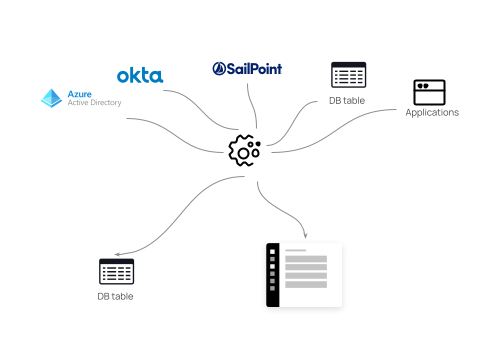
In cases where multiple systems provide user attributes, a microservice can be deployed to consolidate those attributes into a single database table. The service will then sync with Immuta at scheduled intervals, ensuring that the latest attributes are available for policy enforcement. This approach is ideal for organizations with disparate systems contributing unique attributes for various use cases.
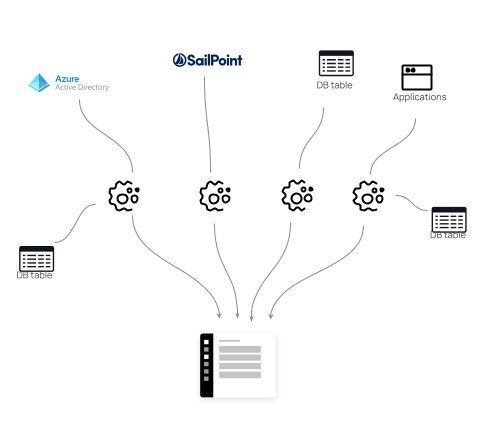
Typically, this model follows one of two patterns:
* **One central microservice**: This model consolidates attributes from various source systems into a single table and syncs with Immuta on a scheduled basis. This approach is well-suited for environments where attributes change infrequently or where multiple systems contribute overlapping attributes.
* **One-to-many microservices**: In this model, each microservice handles attributes from a specific source system and updates Immuta either through database syncs or via direct API integration. This method is ideal for organizations with federated systems, where each domain or region manages unique user attributes.
Event-based approach
For environments where user attributes change frequently, an event-driven model can be used. In this scenario, serverless functions or event-based services trigger updates to Immuta whenever user attributes change in the source system. This method ensures that Immuta always has the most up-to-date information without needing frequent manual synchronization.
## Managing user profiles in Immuta
Once user metadata is synced from external sources, Immuta consolidates this information into user profiles, which are used to define and enforce access controls based on the user’s attributes and group memberships.
For guidance on managing user profiles and metadata, see the [Immuta users section](/saas/configuration/people/users-index.md).
[^1]: Key-value pairs assigned directly to a user, such as `department: finance` or `location: US`.\
\
Attributes can also be assigned to groups and inherited by all members. For example, a group named `Field_Sales` may have the attribute `territories: OH, MD`.
[^2]: Groups assigned to that user in their identity provider or in Immuta.
---
# Agent Instructions
This documentation is published with GitBook. GitBook is the documentation platform designed so that both humans and AI agents can read, navigate, and reason over technical content effectively. Learn more at gitbook.com.
## Querying This Documentation
If you need additional information that is not directly available in this page, you can query the documentation by asking a question.
Perform an HTTP GET request on the following URL with the `ask` and `goal` query parameters:
```
GET https://documentation.immuta.com/saas/configuration/people.md?ask=&goal=
```
`ask` is the immediate question: it should be specific, self-contained, and written in natural language.
`goal` is what the user is ultimately trying to achieve, the reason they need the answer. Sharing it helps GitBook give you a better, more relevant answer. A goal is most helpful when it describes the outcome the user wants rather than restating the question. For example, with `ask=how do I create an API token`, a goal like `automate deployments from our CI pipeline` lets GitBook tailor the answer to that use case.
The response will contain a direct answer to the question and relevant excerpts and sources from the documentation.
Use this mechanism when the answer is not explicitly present in the current page, you need clarification or additional context, or you want to retrieve related documentation sections.