# Managing User Metadata

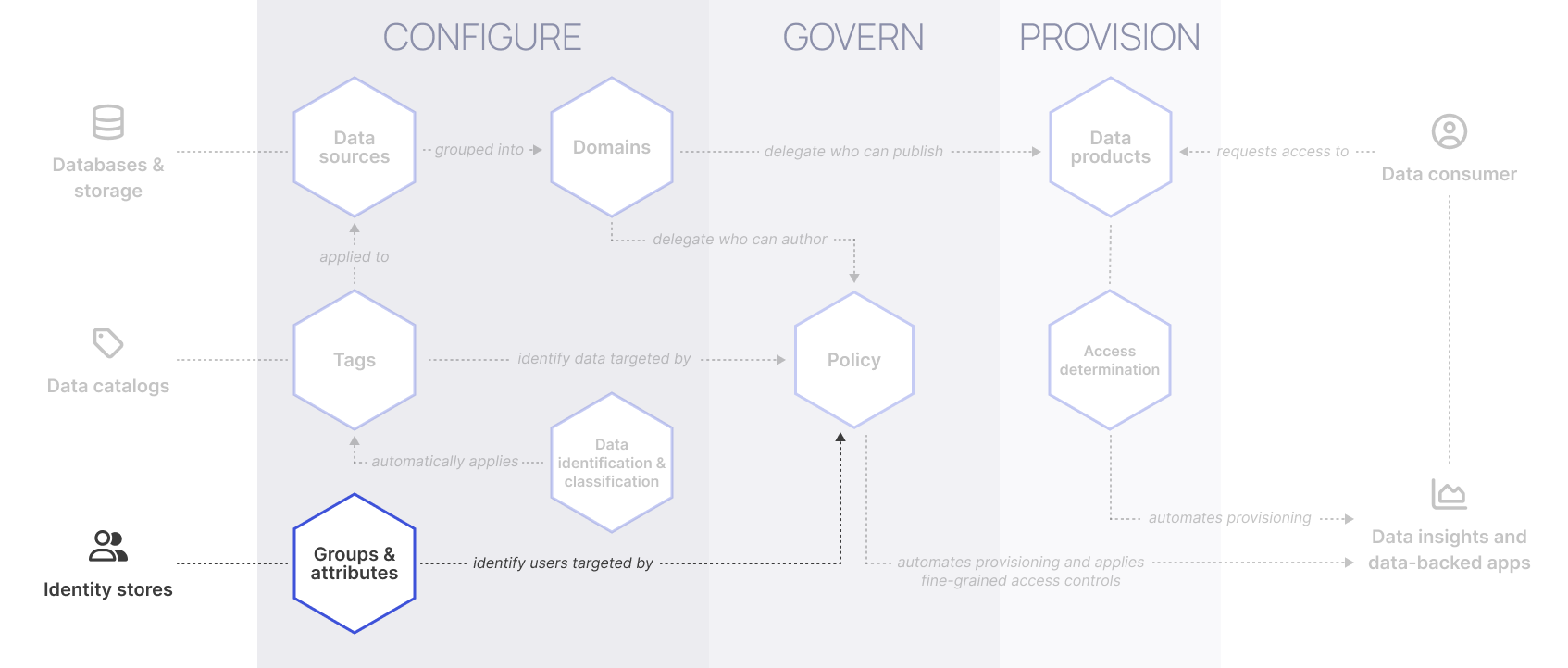
This guide focuses on how to organize and manage user metadata, which is used by Immuta to identify users targeted by policy:

<figure><picture><source srcset="https://1751699907-files.gitbook.io/~/files/v0/b/gitbook-x-prod.appspot.com/o/spaces%2FlWBda5Pt4s8apEhzXGl7%2Fuploads%2Fgit-blob-ff7825a976da44ad158bb7d1b103de1aaedbc064%2Fmanage-user-metadata-dark.png?alt=media" media="(prefers-color-scheme: dark)"><img src="https://1751699907-files.gitbook.io/~/files/v0/b/gitbook-x-prod.appspot.com/o/spaces%2FlWBda5Pt4s8apEhzXGl7%2Fuploads%2Fgit-blob-715389356c3809db31686035a4bce4f91c683e3a%2Fmanage-user-metadata-light.png?alt=media" alt=""></picture><figcaption></figcaption></figure>

To manage user metadata with this particular use case, you should use the [ABAC method as described in the Governance use cases introduction](https://documentation.immuta.com/saas/govern/getting-started-with-secure/..#is-access-determined-by-many-variables).

This is because you must know the contents and sensitivity of **every** column in your data ecosystem to follow this use case. With orchestrated RBAC, you tag your columns with access logic baked in. ABAC means you tag your columns with facts: what is in the column. It is feasible to do the latter, extremely hard to do the former (unless you use [tag lineage](https://documentation.immuta.com/saas/govern/getting-started-with-secure/open-managing-data-metadata#tag-lineage) described in the next topic), especially in a data ecosystem with constant change. This means that your users will need to have facts about them that drive policy decisions (ABAC) rather than single variables that drive access (as in orchestrated-RBAC).

Understanding that, read the ABAC section in the automate data access control decisions use case's [Managing user metadata](https://documentation.immuta.com/saas/govern/automate-data-access-control-decisions/managing-user-metadata#abac-user-attributes-and-groups) guide.

## Next steps

<table data-card-size="large" data-view="cards"><thead><tr><th></th><th></th><th></th></tr></thead><tbody><tr><td><strong>Learn</strong></td><td>Read these guides to learn more about using Immuta to mask sensitive data.</td><td><ol><li><a href="">Compliantly open more sensitive data for ML and analytics</a>: Review this use case to understand how to mask or open up sensitive data to certain users for machine learning and analytics while remaining compliant.</li><li><a href="open-managing-data-metadata">Managing data metadata</a>: This guide describes how to manage your data metadata and create meaningful tags before you use them to author policies.</li><li><a href="open-author-policy">Author policy</a>: This guide describes how to define your global data policy logic.</li></ol></td></tr><tr><td><strong>Implement</strong></td><td>Follow these guides to start using Immuta to mask sensitive data.</td><td><ol><li><a href="open-managing-user-metadata/manage-user-metadata-how-to-guide">Manage user metadata</a>. Tag your users with attributes and groups that are meaningful for Immuta global policies.</li><li><a href="open-managing-data-metadata/manage-data-metadata-how-to-guide">Manage data metadata</a>. Tag your columns with tags that are meaningful.</li><li><a href="open-author-policy/author-policy-how-to-guide">Author policy</a>. Define your global data policy logic.</li><li>Optionally <a href="../test-and-deploy-policy">test and deploy policy</a>.</li></ol></td></tr></tbody></table>


---

# Agent Instructions: Querying This Documentation

If you need additional information that is not directly available in this page, you can query the documentation dynamically by asking a question.

Perform an HTTP GET request on the current page URL with the `ask` query parameter:

```
GET https://documentation.immuta.com/saas/govern/getting-started-with-secure/compliantly-open-more-sensitive-data-for-ml-and-analytics/open-managing-user-metadata.md?ask=<question>
```

The question should be specific, self-contained, and written in natural language.
The response will contain a direct answer to the question and relevant excerpts and sources from the documentation.

Use this mechanism when the answer is not explicitly present in the current page, you need clarification or additional context, or you want to retrieve related documentation sections.