# Understanding Review Assist

{% hint style="info" %} <i class="fa-sparkles">:sparkles:</i> [**AI-powered feature**](/saas/configuration/application-configuration/reference-guides/immuta-ai-faq/immutas-ai-features.md)
{% endhint %}

## What is review assist?

Review assist is a calculated recommendation for determinations on access requests for data access. It monitors the final access request determination made by humans (your data stewards), and finds trends. Then, based on those trends, it will recommend for an access request to be approved, temporarily approved, or denied.

When finding trends, it looks across factors that determine access approvals, temporary approvals, or denials:

1. The data product or asset itself; trend tracking is per data product or asset.
2. Metadata about the requestors, such as the groups and attributes they possess.
3. Requestors' responses to the questions in the request form ([private preview](#user-response-context)).

An AI-generated justification for the decision will accompany the recommendation and pre-populate in the access request response to submit with the access determination. This AI-generated justification is based on the trends across the factors listed, as well as prior human-entered justifications. For temporary approvals, review assist also considers past temporary approvals to determine the recommended duration.

The review assistant provides a risk score to instill confidence and will show a low risk for determinations that align well with the trend. The risk will increase in severity the more differences it detects between the user requesting access and the previous determinations that were made.

* Low: The user has attributes or groups that align well with trends of other determinations and similar users were likely to be granted access. The review assistant is confident in the recommendation.
* Moderate: The user may have some attributes or groups that were within the trends of other determinations, but similar users were both approved and denied. The review assistant is less confident in the recommendation.
* High: The user does not have attributes or groups that were found in the other determinations and the review assistant cannot make a determination based on those trends.

## What does review assist do?

Here is an example that considers the factors: the data product and the user metadata.

**Past requests for data product:** `Company data`

<table><thead><tr><th width="99.55078125">User</th><th width="192.65234375">User's group(s)</th><th width="135.02734375">Determination</th><th>Justification</th></tr></thead><tbody><tr><td>Anna</td><td>Interns</td><td>DENY</td><td>Interns can't see this data</td></tr><tr><td>Bob</td><td>Interns</td><td>DENY</td><td>Can't share with temporary employees</td></tr><tr><td>Chris</td><td>Managers</td><td>APPROVE</td><td>Fine for managers</td></tr><tr><td>Dale</td><td>Engineers &#x26; Interns</td><td>DENY</td><td>Not appropriate for interns</td></tr><tr><td>Erin</td><td>Interns</td><td>DENY</td><td>Intern</td></tr><tr><td>Fran</td><td>Engineers</td><td>APPROVE</td><td>Engineering initiative requires it</td></tr><tr><td>Grace</td><td>Marketing</td><td>APPROVE</td><td>Not using for direct targeting</td></tr><tr><td>Hank</td><td>Accounts payable</td><td>APPROVE</td><td>Required for payments</td></tr><tr><td>Zeke</td><td>Engineers</td><td>APPROVE</td><td>Engineering initiative</td></tr></tbody></table>

Denials appear to be strongly correlated with being in the Intern group (and approvals are correlated with **not** being in the Intern group).

Now we have a new request for data product `Company data`:

| User  | Group(s) | Determination | Justification |
| ----- | -------- | ------------- | ------------- |
| Clete | Sales    | PENDING       |               |

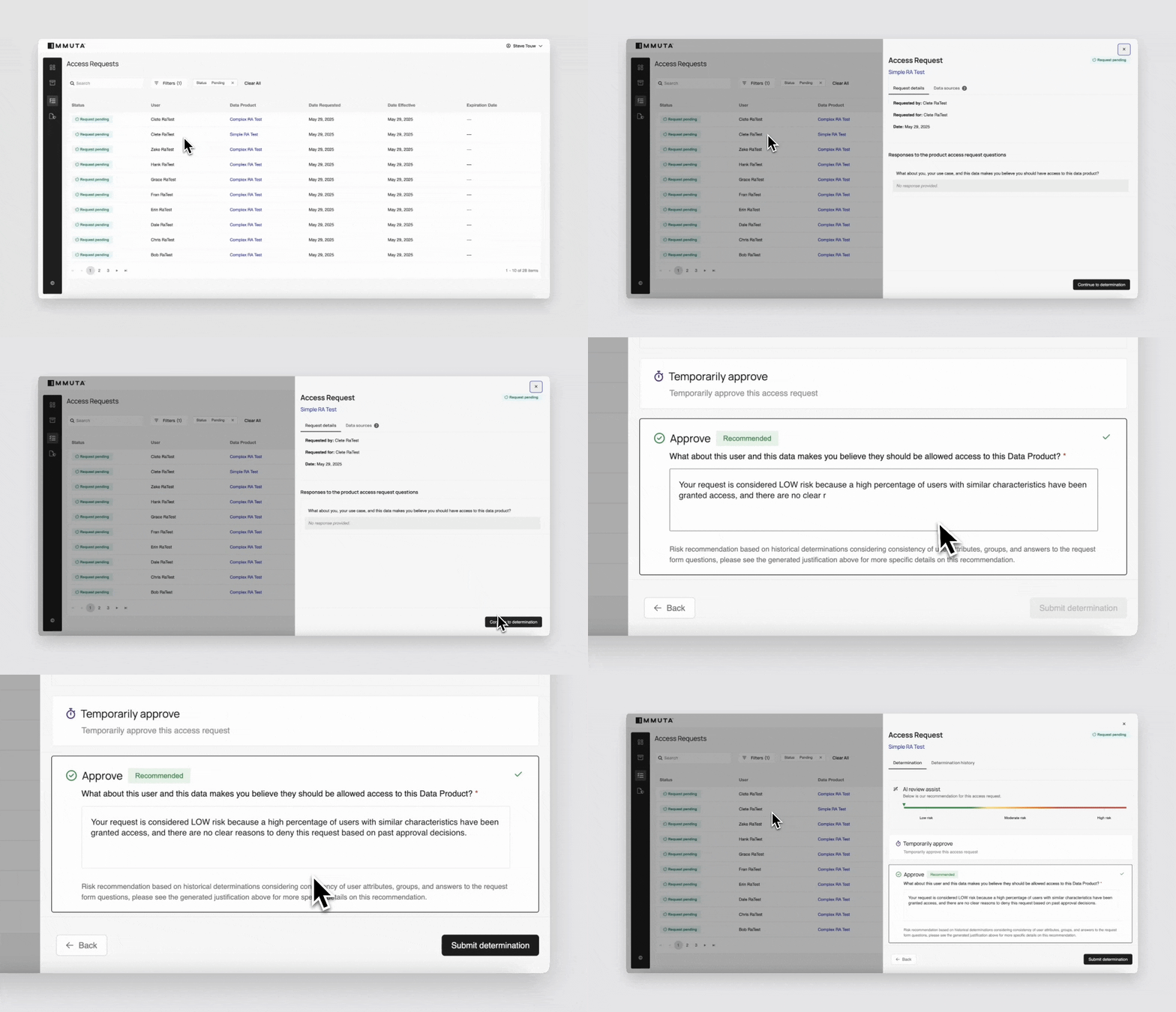
Review assist would recommend to approve this request since Clete is not in the Intern group. So the data steward would see this recommendation, along with an AI-generated justification:

> *Your request is considered LOW risk because a high percentage of users with similar characteristics have been granted access, and there are no clear reasons to deny this request based on past approval decisions.*

<figure><img src="/files/kXFIxbKBQj08KvMIEGTB" alt=""><figcaption></figcaption></figure>

These recommendation details help the steward understand why his request should be appropriate to approve. Since they’re based on past data stewards’ similar determinations, the steward can feel confident in their approval decision. Once approved, Clete will automatically be provisioned the data in the data platform and can query it immediately.

The steward can disagree with review assist's recommendation if this is a unique user. They simply need to change the determination and edit the justification.

### User response context

{% hint style="info" %}
**Private preview**: This feature is available to select accounts. Contact your Immuta representative to enable this feature on your account.
{% endhint %}

By default, review assist evaluates a risk level for an access request based on the user's groups and attributes compared to previous determinations. In private preview, review assist can also look at the user's responses to the questions on the request form and evaluate based on the actual responses.

Review assist will look for patterns in the user's responses by classifying those responses into categories in order to find trends in the response, such as topics, activity, and purpose. It will then detect those patterns in categories as compared to how well they align with human-made determinations and make determination recommendations that align with the detected patterns. Additionally, review assist will notice when the user's response is possibly malicious, recommending that the request is denied and showing it as highly risky.

## When can I use review assist?

Review assist will automatically appear on access requests when available. This will be whenever a trend is detected and could require more than 11 human-managed determinations.

If it has enough history of determinations, but a trend is not clear, it will recommend a temporary approval. This temporary approval will be recommended for a duration matching previous determinations or a reasonable default if no previous determinations are available.

## How does review assist work with multiple approvers?

Review assist only takes into account the final determination of an access request. This means that if you have an access request with 3 differing determinations, only the final, most-restrictive determination will be considered by the review assist in future recommendations.

## Limitation

Review assist is only available with access requests for data access; it is not available with masking exceptions.


---

# Agent Instructions: Querying This Documentation

If you need additional information that is not directly available in this page, you can query the documentation dynamically by asking a question.

Perform an HTTP GET request on the current page URL with the `ask` query parameter:

```
GET https://documentation.immuta.com/saas/request/review-access-requests/reference-guides/understanding-review-assist.md?ask=<question>
```

The question should be specific, self-contained, and written in natural language.
The response will contain a direct answer to the question and relevant excerpts and sources from the documentation.

Use this mechanism when the answer is not explicitly present in the current page, you need clarification or additional context, or you want to retrieve related documentation sections.
