> For the complete documentation index, see [llms.txt](https://documentation.immuta.com/saas/llms.txt). Markdown versions of documentation pages are available by appending `.md` to page URLs; this page is available as [Markdown](https://documentation.immuta.com/saas/~/changes/l3NnvynMHxi6VvqRtJhK/application-configuration/how-to-guides/private-networking-support/redshift-privatelink.md).
# AWS PrivateLink for Redshift
{% hint style="info" %}
**Private preview**: This feature is only available to select accounts.
{% endhint %}
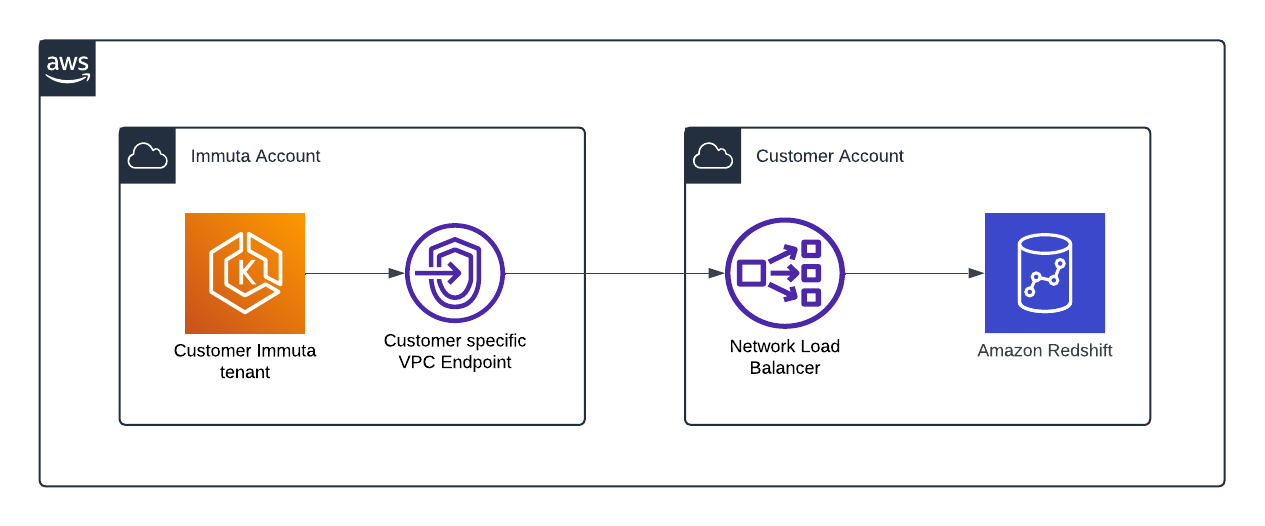
AWS PrivateLink provides private connectivity from the Immuta SaaS platform to customer-managed Redshift Clusters hosted on AWS. It ensures that all traffic to the configured endpoints only traverses private networks.
This feature is supported in most regions across Immuta's Global Segments (NA, EU, and AP); contact your Immuta account manager if you have questions about availability.
## Requirements
* You have an Immuta SaaS tenant.
* You have set up an [AWS PrivateLink Service](https://docs.aws.amazon.com/vpc/latest/privatelink/privatelink-share-your-services.html) for your Redshift Cluster endpoints.
* If you have configured [Private DNS Hostnames](https://docs.aws.amazon.com/vpc/latest/privatelink/manage-dns-names.html) on your PrivateLink Service, the domain ownership must be verifiable via a public DNS zone. This means that you cannot use a *Top-Level Domain* (TLD) that is not publicly resolvable, e.g. `redshift.mycompany.internal`.
* If you are using TLS, the presented certificate must have the *Fully-Qualified Domain Name* (FQDN) of your cluster as a *Subject Alternative Name* (SAN).
* When creating the service, make sure that the **Require Acceptance** option is checked (this does not allow anyone to connect, all connections will be blocked until the Immuta Service Principal is added).
## Configure Redshift with AWS PrivateLink
1. Open a support ticket with [Immuta Support](https://support.immuta.com) with the following information:
* AWS Region
* AWS Subnet Availability Zones IDs (e.g. `use1-az3`)
* VPC Endpoint Service ID
* DNS Hostname
* Ports Used
2. [Authorize the Service Principal](https://docs.aws.amazon.com/vpc/latest/privatelink/configure-endpoint-service.html#add-remove-permissions) provided by your representative so that Immuta can complete the VPC Endpoint configuration.
3. [Configure the Redshift integration](/saas/~/changes/l3NnvynMHxi6VvqRtJhK/integrations/redshift/how-to-guides/redshift.md).
4. [Register your tables as Immuta data sources](/saas/~/changes/l3NnvynMHxi6VvqRtJhK/data-and-integrations/registering-metadata/register-data-sources/redshift-tutorial.md).
---
# Agent Instructions
This documentation is published with GitBook. GitBook is the documentation platform designed so that both humans and AI agents can read, navigate, and reason over technical content effectively. Learn more at gitbook.com.
## Querying This Documentation
If you need additional information that is not directly available in this page, you can query the documentation dynamically by asking a question.
Perform an HTTP GET request on the current page URL with the `ask` query parameter, and the optional `goal` query parameter:
```
GET https://documentation.immuta.com/saas/~/changes/l3NnvynMHxi6VvqRtJhK/application-configuration/how-to-guides/private-networking-support/redshift-privatelink.md?ask=&goal=
```
`ask` is the immediate question: it should be specific, self-contained, and written in natural language.
`goal` is optional and describes the broader end goal you are ultimately trying to accomplish on behalf of the user. GitBook uses it to tailor the answer towards what is most useful for that goal.
The response will contain a direct answer to the question and relevant excerpts and sources from the documentation.
Use this mechanism when the answer is not explicitly present in the current page, you need clarification or additional context, or you want to retrieve related documentation sections.