> For the complete documentation index, see [llms.txt](https://documentation.immuta.com/knowledge-base/LmMmmLqSszWn8sdGe7gH/llms.txt). Markdown versions of documentation pages are available by appending `.md` to page URLs; this page is available as [Markdown](https://documentation.immuta.com/knowledge-base/LmMmmLqSszWn8sdGe7gH/snowflake/immuta-snowflake-credit-cost.md).
# Immuta Snowflake Credit Cost
Most of the information regarding Snowflake credit costs is obtained directly from Snowflake's official site. For the latest details, please refer to Snowflake's most recent credit cost information.
## Content List
1. Snowflake pricing, editions, and storage model
2. Virtual warehouses and credits
3. Snowflake Storage details
4. Virtual warehouse costs breakdown
5. Identify how many “CREDITS\_USED\_CLOUD\_SERVICES” by the **Immuta** Application.
### 1. Snowflake pricing, editions, and storage model
Snowflake decouples compute and storage, and each has a different pricing model. Check Snowflake official site for latest updates.
* Pricing depending on region for both credit on editions and storage usage type. More info here: [Pricing Options](https://www.snowflake.com/pricing/)
* There different editions Snowflake offers **per/credit** at the time of this write up:
* **Standard -** introductory level
* **Enterprise** (includes all features from Standard) - large-scale enterprise
* **Business Critical** (includes all features from Enterprise)- higher level of data protection for very sensitive data
* **Virtual Private** (includes all features from Business Critical)- highest level of security from Snowflake documentation
* Storage has two different offers **per/month**:
* **Capacity Storage -** pay upfront for defined capacity size
* **On-Demand Storage -** pay only what you used
### 2. Virtual warehouses and credits
* A snowflake **credit is a unit of measure**, and it is consumed for virtual warehouse(size) being active not the number of SQL executed.
* Each credit is priced differently based on **region** and **platform**(AWS, Azure, GCP)
* Snowflake credits are billed by the second with a **one-minute** minimum on active warehouse
* Recommended to set **auto-suspend** and **auto-resume** for warehouse configuration
* Warehouses consume credits depending on the size: [Overview of warehouses | Snowflake Documentation](https://docs.snowflake.com/en/user-guide/warehouses-overview.html)
* There is a significant difference on **credit consumption** between an X-Small and 4X-Large.
### 3. Snowflake Storage details
* Snowflake storage cost details can be found here: [Pricing Options](https://www.snowflake.com/pricing/)
* Storage is charged based on the daily average storage used for the month.
* Using the `ACCOUNTADMIN` role, go to “Account” → “Billing & Usage” will have the average storage used.
* Storage is combined of database storage, stage objects, and fail safe.
* **Data transfer** (i.e stage objects for loading data to snowflake) within the same region is free while cross-region incurs a cost.
* **Capacity Storage -** pay upfront for defined capacity size
* **On-Demand Storage -** pay only what you used
### 4. Virtual warehouse and storage cost breakdown
* Each region and platform price Snowflake editions differently.
* **Virtual Private** Edition pricing - contact Snowflake
* More Snowflake pricing details here: [Pricing Options](https://www.snowflake.com/pricing/)
### 5. Identify how many “CREDITS\_USED\_CLOUD\_SERVICES” by the **Immuta** Application
* The **`"SNOWFLAKE"."ACCOUNT_USAGE"."QUERY_HISTORY"`** table has a column **`“CREDITS_USED_CLOUD_SERVICES”`** which shows how many credit each executed SQL statement used and this is based on the the `“TOTAL_ELAPSED_TIME”` - and the time is calculated by the **start\_time** and the **end\_time** of the SQL execution.
* The **`QUERY_HISTORY`** table also holds the **`SESSION_ID`** info on which session the SQL statement was executed by.
* Use `ACCOUNTADMIN` and run the following to get a small sample of this **`QUERY_HISTORY`** table:
```
select * from "SNOWFLAKE"."ACCOUNT_USAGE"."QUERY_HISTORY" limit 10;
```
* The **"SNOWFLAKE"."ACCOUNT\_USAGE"."SESSIONS"** table holds detail of each session(**SESSION\_ID** column) connected to Snowflake from which application. The application info is stored in the “**CLIENT\_ENVIRONMENT**” column on this table; this column is a **JSON** object.
* Use ACCOUNTADMIN and run the following to get a small sample of this **SESSIONS** table:
```
select * from "SNOWFLAKE"."ACCOUNT_USAGE"."SESSIONS" limit 10;
```
* Review the `CLIENT_ENVIRONMENT` column(JSON Object) to find all “**APPLICATION**” connected and executed SQL on Snowflake.
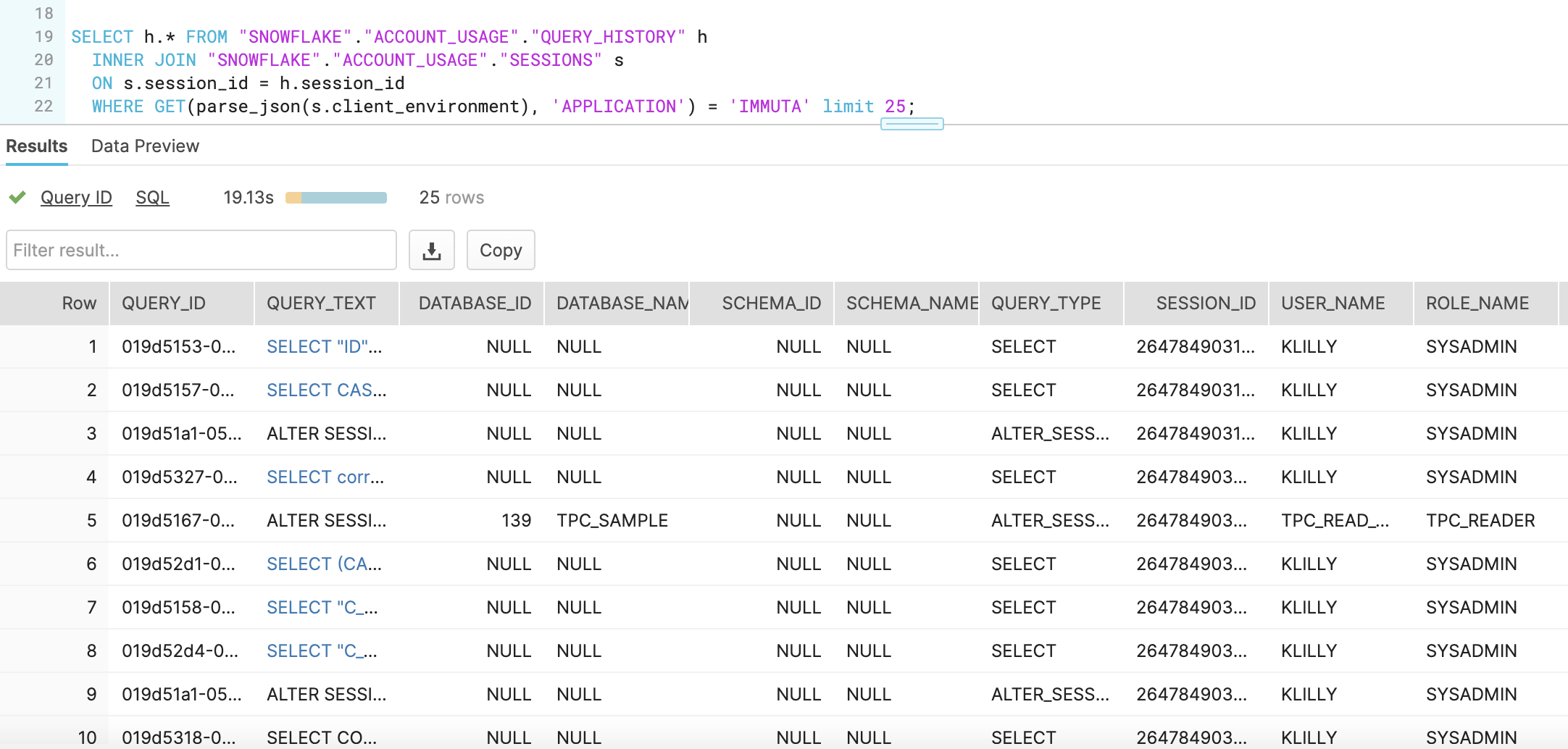
* By identifying which `session_id` executed SQL coming from the Immuta application, you can determine which SQL statements were run by Immuta, how long they executed, and the credits consumed. The following query provides these details by querying the `QUERY_HISTORY` table and performing an **INNER JOIN** with the `SESSIONS` table using the `SESSION_ID`. It then filters for entries where the `APPLICATION` field in the `CLIENT_ENVIRONMENT` JSON object equals IMMUTA.
```
SELECT h.* FROM "SNOWFLAKE"."ACCOUNT_USAGE"."QUERY_HISTORY" h
INNER JOIN "SNOWFLAKE"."ACCOUNT_USAGE"."SESSIONS" s
ON s.session_id = h.session_id
WHERE GET(parse_json(s.client_environment), 'APPLICATION') = 'IMMUTA' limit 25;
```
* Outcome example:
* With the above information, you can build your own query to determine how often, how long, and how much Snowflake credit Immuta incurs in Snowflake.
---
# Agent Instructions
This documentation is published with GitBook. GitBook is the documentation platform designed so that both humans and AI agents can read, navigate, and reason over technical content effectively. Learn more at gitbook.com.
## Querying This Documentation
If you need additional information that is not directly available in this page, you can query the documentation dynamically by asking a question.
Perform an HTTP GET request on the current page URL with the `ask` query parameter, and the optional `goal` query parameter:
```
GET https://documentation.immuta.com/knowledge-base/LmMmmLqSszWn8sdGe7gH/snowflake/immuta-snowflake-credit-cost.md?ask=&goal=
```
`ask` is the immediate question: it should be specific, self-contained, and written in natural language.
`goal` is optional and describes the broader end goal you are ultimately trying to accomplish on behalf of the user. GitBook uses it to tailor the answer towards what is most useful for that goal.
The response will contain a direct answer to the question and relevant excerpts and sources from the documentation.
Use this mechanism when the answer is not explicitly present in the current page, you need clarification or additional context, or you want to retrieve related documentation sections.