# Requirements

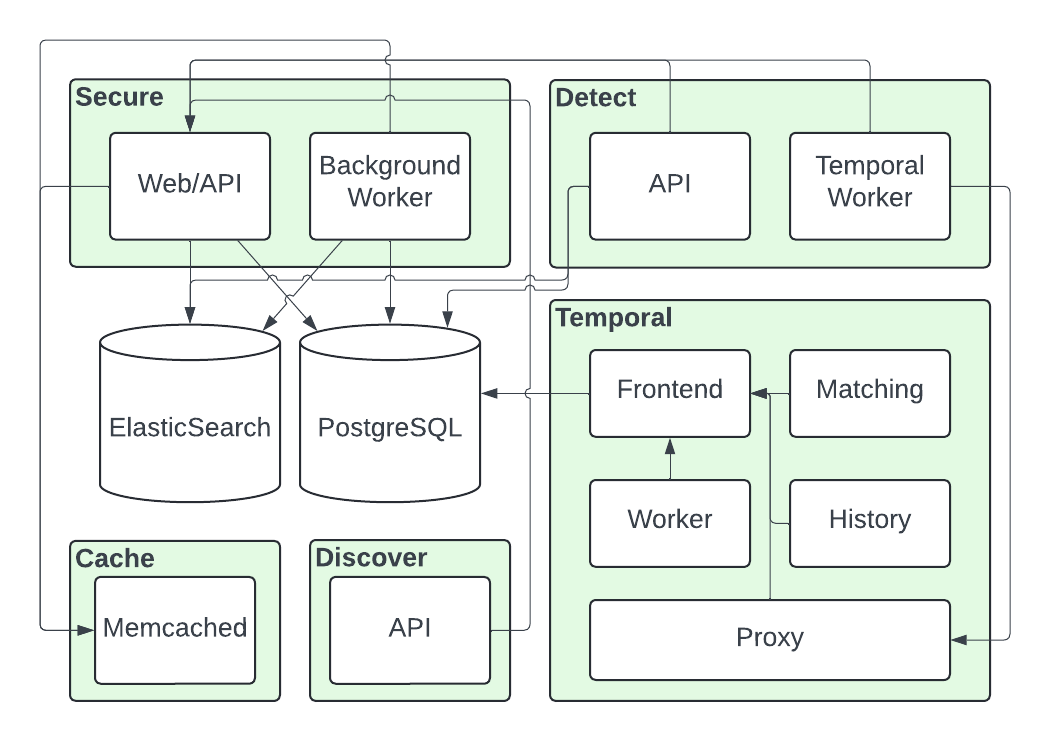
Immuta comprises three core services: Secure, Discover, and Detect. These services rely on PostgreSQL and Elasticsearch to store their states, a caching layer, and Temporal for job execution. The illustration below shows the relationships among these services.

<figure><img src="https://2955695839-files.gitbook.io/~/files/v0/b/gitbook-x-prod.appspot.com/o/spaces%2FvKNr8Mg2KppFQkeVQNFE%2Fuploads%2Fgit-blob-90ed6cec4d3a1d9df768f0144163493fe44c2e73%2FImmuta%20Enterprise%20Helm%20Chart.png?alt=media" alt=""><figcaption></figcaption></figure>

The Immuta Enterprise Helm chart (IEHC) does not include the deployment of PostgreSQL or Elasticsearch, so you must deploy them separately.

Although Immuta recommends using Elasticsearch because it supports all audit, you can deploy Immuta without Elasticsearch. The table below outlines the Immuta features supported with and without Elasticsearch and the dependencies you must deploy and manage yourself.

<table><thead><tr><th></th><th width="257.75">Immuta with Elasticsearch</th><th width="250.5">Immuta without Elasticsearch</th></tr></thead><tbody><tr><td>Dependencies</td><td><ul><li><a href="#metadata-database-postgresql">Externalized PostgreSQL</a></li><li><a href="#elasticsearch">Elasticsearch / OpenSearch</a></li></ul></td><td><a href="#metadata-database-postgresql">Externalized PostgreSQL</a></td></tr><tr><td>Immuta Detect</td><td><span data-gb-custom-inline data-tag="emoji" data-code="2705">✅</span></td><td><span data-gb-custom-inline data-tag="emoji" data-code="274c">❌</span></td></tr><tr><td>Audit of Immuta and data platform events</td><td><span data-gb-custom-inline data-tag="emoji" data-code="2705">✅</span></td><td><span data-gb-custom-inline data-tag="emoji" data-code="274c">❌</span></td></tr><tr><td>Legacy audit</td><td><span data-gb-custom-inline data-tag="emoji" data-code="274c">❌</span></td><td><span data-gb-custom-inline data-tag="emoji" data-code="274c">❌</span></td></tr><tr><td>Immuta Monitors</td><td><span data-gb-custom-inline data-tag="emoji" data-code="2705">✅</span></td><td><span data-gb-custom-inline data-tag="emoji" data-code="274c">❌</span></td></tr><tr><td>Identification</td><td><span data-gb-custom-inline data-tag="emoji" data-code="2705">✅</span></td><td><span data-gb-custom-inline data-tag="emoji" data-code="2705">✅</span></td></tr></tbody></table>

For information about legacy databases and services no longer enabled in the recommended deployment of Immuta, see the [Legacy databases section](#legacy-features-and-services).

## Version requirements

### Kubernetes versions

* Kubernetes 1.29 - 1.35

### Metadata database (PostgreSQL)

{% hint style="danger" %}
**PostgreSQL incompatibilities**

Immuta is not compatible with PostgreSQL abstraction layers, such as Amazon Aurora.
{% endhint %}

* PostgreSQL 15.0 or newer
* The `pgcrypto` and `btree_gin` extensions must be enabled

### Elasticsearch

* Elasticsearch v7 API or newer
* AWS OpenSearch Service compatible with Elasticsearch v7 API or newer
  * AWS OpenSearch Serverless is **not supported**

#### OpenSearch user

The user provided during the install must have the following [permissions](https://opensearch.org/docs/latest/security/access-control/permissions/):

* Cluster permissions:
  * cluster:monitor/health
  * indices:data/write/bulk\*
  * indices:data/write/bulk
* Index permissions:
  * indices:data/read/search
  * indices:admin/exists
  * indices:admin/create
  * indices:admin/delete
  * indices:admin/settings/update
  * indices:admin/get
  * indices:data/write/delete/byquery
  * indices:data/write/index
  * indices:admin/mapping/put
  * indices:data/write/bulk
  * indices:data/write/bulk\*

Follow OpenSearch documentation to [create the user](https://docs.aws.amazon.com/opensearch-service/latest/developerguide/createupdatedomains.html#createdomains) and add permissions, or see the [OpenSearch authentication guides](https://documentation.immuta.com/2025.1/configuration/self-managed-deployment/configure/opensearch-authentication).

### Cache (Redis/Memcached)

{% hint style="info" %}
**Built-in cache**

The IEHC manages its own Memcached deployment inside the cluster. The key-value cache can optionally be externalized post installation.
{% endhint %}

* Redis 7.0 or newer
* Memcached 1.6 or newer

### Temporal

{% hint style="info" %}
Built-in Temporal server

The IEHC deploys a Temporal server and its requisite components. However, you may choose to use your own Temporal instance.
{% endhint %}

* Temporal 1.24.2 or newer

## Infrastructure recommendations

<table><thead><tr><th>Kubernetes distribution</th><th>Ingress</th><th>External metadata database</th><th>External Elasticsearch</th><th data-hidden>External cache</th></tr></thead><tbody><tr><td>Amazon Elastic Kubernetes Service (EKS)</td><td>AWS Load Balancer Controller</td><td><a href="https://docs.aws.amazon.com/rds/">Amazon RDS for PostgreSQL</a></td><td><a href="https://docs.aws.amazon.com/opensearch-service/">Amazon OpenSearch</a></td><td><a href="https://docs.aws.amazon.com/elasticache/">Amazon ElastiCache for Redis</a></td></tr><tr><td>Azure Kubernetes Service (AKS)</td><td>Azure Application Gateway Ingress Controller</td><td><a href="https://learn.microsoft.com/en-us/azure/postgresql/">Azure Database for PostgreSQL</a></td><td><a href="https://www.elastic.co/partners/microsoft-azure">Elastic Cloud on Azure</a></td><td><a href="https://learn.microsoft.com/en-us/azure/azure-cache-for-redis/">Azure Cache for Redis</a></td></tr><tr><td>Google Kubernetes Engine (GKE)</td><td>GKE Ingress Controller</td><td><a href="https://cloud.google.com/sql/docs/postgres">Google Cloud SQL for PostgreSQL</a></td><td><a href="https://www.elastic.co/partners/google-cloud">Elastic Cloud on Google Cloud</a></td><td><a href="https://cloud.google.com/memorystore/docs/redis">Memorystore for Redis</a></td></tr><tr><td>Red Hat OpenShift</td><td>OpenShift Ingress Operator</td><td><a data-footnote-ref href="#user-content-fn-1">Cloud-managed PostgreSQL</a></td><td><a data-footnote-ref href="#user-content-fn-2">Cloud-managed Elasticsearch</a></td><td><a data-footnote-ref href="#user-content-fn-3">Cloud-managed Redis</a></td></tr></tbody></table>

### Legacy databases <a href="#legacy-features-and-services" id="legacy-features-and-services"></a>

Some legacy databases are no longer available when deploying Immuta using the recommended configuration of the IEHC. See the [Enable the legacy query engine guide](https://documentation.immuta.com/2025.1/configuration/self-managed-deployment/configure/enabling-legacy-query-engine) to enable support for these [databases](https://documentation.immuta.com/2025.1/releases/support-matrix#legacy-databases).

[^1]: Cloud-managed PostgreSQL, such as Amazon RDS, Azure Database for PostgreSQL, or Google Cloud SQL for PostgreSQL, is recommended when running Kubernetes in cloud environments.

[^2]: Cloud-managed Elasticsearch, such as Amazon OpenSearch, or Elastic Cloud, is recommended when running Kubernetes in cloud environments.

[^3]: Cloud-managed Redis/Memcached, such as Amazon ElastiCache, Azure Cache, or Google Cloud Memorystore, is recommended when running Kubernetes in cloud environments.