> For the complete documentation index, see [llms.txt](https://documentation.immuta.com/2024.2/llms.txt). Markdown versions of documentation pages are available by appending `.md` to page URLs; this page is available as [Markdown](https://documentation.immuta.com/2024.2/secure-your-data/getting-started-with-secure/overview-2/apply-federated-governance.md).
# Apply Federated Governance
In the distributed domains of a data mesh architecture, data governance and access control must be applied vertically (locally) within specific domains or data products and horizontally (globally). Global policies should be authored and applied in line with the ecosystem’s most generic and all-encompassing principles, regardless of the data’s domain (e.g., mask all PII data). Localized domain- or product-level policies should be fine-grained and applicable to only context-specific purposes or use cases (e.g., only show rows in the Sales table where the country value matches the user's office location). In Immuta we distinguish between subscription policies and data policies.
## Subscription policies
To access a data source, Immuta users must first be subscribed to that data source. A subscription policy determines [who can request access](#subscription-policies-for-a-data-product-"shopping"-experience) to a data source or group of data sources. Alternatively, a subscription policy can also be configured to [automatically provide access](/2024.2/secure-your-data/getting-started-with-secure/automate-data-access-control-decisions.md) based on a user’s profile, such as being part of a certain group or having a particular attribute.
It is possible to build Immuta subscription policies across all data products (horizontal), as shown in the diagram above, and then have those policies merged with additional subscription policies authored at the domain level (vertical). When this occurs, those subscription policies are **merged** as prescribed by the two or more policies being merged.
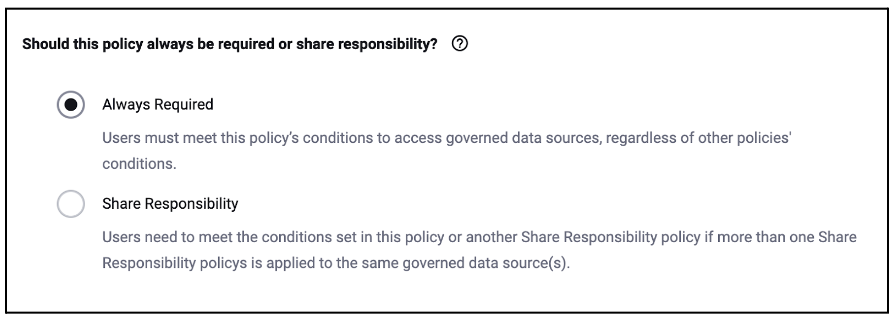
Whether the requirements for access are merged with an AND or an OR is prescribed by this setting in the policy builder for each of the individual policies:
* Always Required = AND
* Share Responsibility = OR
You can find a specific example of subscription policy merging in the [Automate data access control decisions](/2024.2/secure-your-data/getting-started-with-secure/automate-data-access-control-decisions/author-policy.md#abac-policy-authoring) use case, but in the case of data mesh, the policies are authored by completely separate users - one user at the global (horizontal) level with [`GOVERNANCE` permission](/2024.2/people/immuta-users/reference-guides/personas-and-permissions.md) and the second at the domain (vertical) level with the [`Manage policies` permission (in domain)](/2024.2/secure-your-data/domains/domains.md#permissions).
## Subscription policies for a data product "shopping" experience
When building subscription policies, it can impact what a user can discover and, if desired, "put in their shopping cart" to use.
We'll discuss the ["shopping" experience](/2024.2/secure-your-data/getting-started-with-secure/overview-2/discover-and-subscribe-data-products.md) in the next guide, but how you are able to manage this in subscription policies is found here:
* **Allow Data Source Discovery**: Normally, if a user does not meet the subscription policy, that data source is hidden from them in the Immuta UI. Should you check this option when building your subscription policy, the inverse is true: anyone can see this data source. This is important if you want users to understand if the data product exists, even if they don't have access.
* **Require Manual Subscription**: Even if the user *does* meet the policy, instead of automatically subscribing them, they would have to discover and subscribe themselves. If they meet the policy, they will automatically be subscribed with no intervention. This is important if you want the users to maintain the list of data products they see in the data platform rather than *all* data products they have access to.
* **Request Approval to Access**: This allows the user to request access, even if they don't meet the policy. Rules can determine what user manually overrides the policy to let them in.
## Data policies
Once a user is subscribed to a data source via Immuta or has a pre-existing direct access on the underlying data platform, the data policies that are applied to that data source determine what data the user sees. Data policy types include masking, row-level, and other privacy-enhancing techniques.
An exemplary three-step approach to managing data policies would be
* [Create global data policies](/2024.2/secure-your-data/getting-started-with-secure/compliantly-open-more-sensitive-data-for-ml-and-analytics/open-author-policy.md) on the tags resulting from the out-of-the-box sensitive data discovery.
* [Develop business specific frameworks](/2024.2/detect-your-activity/getting-started/overview/automate-entity-and-sensitivity-discovery.md) and protection rules and controlled them via data policies.
* Update the global data policies as new sensitive data is potentially released by data products and discovered using Immuta Detect.
## Strategy
Data mesh is a higher level use case that pulls from concepts learned across the other use cases:
* [Monitor and secure sensitive data platform query activity](/2024.2/detect-your-activity/getting-started/overview.md): How can you proactively monitor for data products that are leaking sensitive data?
* [Automate data access control decisions](/2024.2/secure-your-data/getting-started-with-secure/automate-data-access-control-decisions.md): How do you manage table access across your data products?
* [Compliantly open more sensitive data for ML and analytics](/2024.2/secure-your-data/getting-started-with-secure/compliantly-open-more-sensitive-data-for-ml-and-analytics.md): How do you manage granular access and mitigate concerns about sensitive data leaks in data products?
Our recommended strategy is that you decide if you want to [automatically subscribe](/2024.2/secure-your-data/getting-started-with-secure/automate-data-access-control-decisions.md) users to data products or if you want a workflow where they [discover and subscribe](/2024.2/secure-your-data/getting-started-with-secure/overview-2/discover-and-subscribe-data-products.md) to data products. In either case, you can delegate some policy ownership to the data product creators both by allowing them to [tag their data with facts](/2024.2/secure-your-data/getting-started-with-secure/overview-2/managing-data-metadata.md) that drive global data policies and allowing domain-specific subscription policy authoring which merges with global subscription policies.
---
# Agent Instructions
This documentation is published with GitBook. GitBook is the documentation platform designed so that both humans and AI agents can read, navigate, and reason over technical content effectively. Learn more at gitbook.com.
## Querying This Documentation
If you need additional information that is not directly available in this page, you can query the documentation by asking a question.
Perform an HTTP GET request on the following URL with the `ask` and `goal` query parameters:
```
GET https://documentation.immuta.com/2024.2/secure-your-data/getting-started-with-secure/overview-2/apply-federated-governance.md?ask=&goal=
```
`ask` is the immediate question: it should be specific, self-contained, and written in natural language.
`goal` is what the user is ultimately trying to achieve, the reason they need the answer. Sharing it helps GitBook give you a better, more relevant answer. A goal is most helpful when it describes the outcome the user wants rather than restating the question. For example, with `ask=how do I create an API token`, a goal like `automate deployments from our CI pipeline` lets GitBook tailor the answer to that use case.
The response will contain a direct answer to the question and relevant excerpts and sources from the documentation.
Use this mechanism when the answer is not explicitly present in the current page, you need clarification or additional context, or you want to retrieve related documentation sections.